




YouTube Thumbnails: How to Create High-CTR Thumbnails That Get More Views
Taking some healthy cooking classes will teach you how to make healthy foods at home? Perhaps a Chef LeeZ cooking class.
THUMBNAILS
The Silent Click Machine of YouTube
A YouTube thumbnail is not decoration. It is the single most influential factor in whether someone clicks your video after seeing the title. Before your script, editing, or even audio quality matters — the thumbnail decides if your video gets a chance at all.
This guide covers:
- Why thumbnails matter (with real metrics)
- How to design high‑performing thumbnails
- Tools and services that remake viral thumbnails into original versions
- Costs and licensing considerations
- How thumbnails work differently for Shorts vs long‑form videos
- How to A/B test thumbnails properly
- How to interpret A/B test results to guide future designs
At the end, you’ll have a repeatable system — not guesses.
Why Thumbnails Matter (More Than Titles)
On YouTube, your video is judged in milliseconds.
When your video is shown on Home, Suggested, or Search, viewers subconsciously process:
- Thumbnail (visual emotion + clarity)
- Title (context)
- Channel trust (branding)
If the thumbnail fails, the title is irrelevant.
The Metric That Matters: CTR
Click‑Through Rate (CTR) measures how often viewers click when your video is shown.
- Low CTR = YouTube stops recommending your video
- High CTR = YouTube shows it to more people
A strong thumbnail can double or triple impressions without changing the video.
What Makes a High‑Performing Thumbnail
High‑CTR thumbnails share common traits across niches:
1. One Clear Idea
If your thumbnail needs explaining, it’s already failing.
- One emotion
- One action
- One curiosity trigger
2. Faces + Emotion (When Appropriate)
Human brains are wired to read faces.
- Shock
- Curiosity
- Fear
- Satisfaction
Exaggeration works — realism does not.
3. Minimal Text (or None)
- 1–4 words max
- Must be readable on a phone
- Text should add, not repeat the title
4. High Contrast
- Bright foreground
- Clean background
- Strong subject separation
5. Curiosity Gap
Show enough to provoke a question, but not enough to answer it.
Creating Thumbnails: DIY vs Services
You can create thumbnails yourself, outsource them, or use AI‑assisted tools.
DIY Tools (Low Cost)
- Photoshop / Photopea – Full control, steep learning curve
- Canva – Fast, beginner‑friendly, limited originality
- GIMP – Free but slower workflow
Best for: creators on a budget who want control
Services That Remake Viral Thumbnails (Ethically)
These services analyze what works in viral thumbnails and recreate them without copying.
Important: You should never clone a thumbnail pixel‑for‑pixel. The goal is pattern extraction, not duplication.
1. Thumbnail Designers (Human)
- Fiverr / Upwork specialists
- Dedicated YouTube thumbnail designers
Typical cost:
- $5–$15 (basic)
- $20–$50 (high‑CTR specialists)
Pros:
- Human creativity
- Emotion tuning
Cons:
- Quality varies
- Requires clear briefs
2. AI Thumbnail Tools
These tools analyze viral thumbnails and generate original versions:
- Thumbly AI
- VidIQ Thumbnail AI
- Canva AI Magic Design
Typical cost:
- Free tier limited
- $10–$30/month
Best use: ideation + rapid testing
3. Hybrid Approach (Recommended)
- Analyze viral thumbnails in your niche
- Identify patterns:
- Emotion type
- Framing
- Color palette
- Recreate with:
- Different face
- Different object
- Different text
This avoids copyright and builds originality.
Shorts vs Long‑Form: Thumbnail Reality Check
YouTube Shorts (Mobile)
- Thumbnail is auto‑selected from the video
- Most viewers never see a custom thumbnail
- The first frame matters most
- Best practice:
- Design your opening frame like a thumbnail
- Big subject
- Clear emotion
- No small details
- You can include your thumbnail in the video first frame for 1-2 seconds when editing.
- This allows it to be manually selected on the phone app.
Long‑Form YouTube Videos
- You upload a custom thumbnail
- You can A/B test thumbnails
- Thumbnail heavily influences algorithm performance
This is where optimization matters most.
A/B Testing Thumbnails (Properly)
A/B testing compares multiple thumbnails on the same video.
How YouTube A/B Testing Works
Using tools like:
- YouTube Studio Experiments (rolling out)
- TubeBuddy A/B Testing
- VidIQ Thumbnail Testing
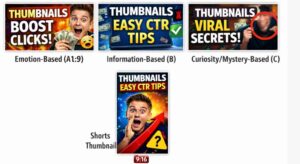
You upload 2–3 thumbnails:
- Version A
- Version B
- Version C (optional)
YouTube rotates them across similar audiences.
Example A/B Thumbnail Concepts
Example 1: Educational Video
A: Face + shocked expression + big number
B: Object close‑up + red arrow
C: Minimal text + blurred background
Example 2: Commentary Video
A: Angry face + bold text
B: Calm face + curiosity framing
C: No face + symbolic image
How to Compare A/B Results
Metrics to Watch
- CTR (Primary)
- Average View Duration (secondary)
- Impressions over time
What the Results Mean
- Higher CTR = stronger initial hook
- If CTR rises but watch time drops → misleading thumbnail
- If CTR + watch time both rise → winner
Using A/B Testing to Choose Future Thumbnails
Do not just pick winners — extract patterns.
Ask:
- Did faces outperform objects?
- Did fewer words work better?
- Did emotion beat information?
Document results in a simple log:
- Video topic
- Thumbnail style
- CTR result
Over time, your thumbnails become predictable in performance, not appearance.
Common Thumbnail Mistakes
- Too much text
- Low contrast colors
- Repeating the title
- Misleading imagery
- Over‑designing for desktop instead of mobile
Final Advice: Treat Thumbnails as Products
Your video is the product.
Your thumbnail is the packaging.
Great packaging doesn’t lie — it entices honestly.
Creators who win on YouTube don’t guess.
They test.
They iterate.
They learn.
You can see our related videos and blogs by the following links.
Our related YouTube shorts,
Our related YouTube Videos
You can see all our wellness related blogs here.
To never miss our future postings sign up to receive our newsletter by the short form below.