



What Is a YouTube Video Refresh? Update vs Re-Upload Explained
Taking some healthy cooking classes will teach you how to make healthy foods at home? Perhaps a Chef LeeZ cooking class.
What Is a YouTube Video Refresh? (And Should You Re-Upload or Update the Original?)
If you’ve heard creators on YouTube talk about “video refresh” and felt confused, you’re not alone. Many people assume it means deleting an old video and re-uploading it — but that’s usually the worst thing you can do.
In this guide, you’ll learn exactly what a YouTube video refresh is, when to use it, when not to use it, and how it fits into an SEO-driven YouTube growth strategy.
What Is a Video Refresh on YouTube?
A video refresh means updating an existing YouTube video — without uploading a new one — to improve performance.
The goal is to:
- Increase click-through rate (CTR)
- Improve watch time and retention
- Give YouTube’s algorithm new signals to re-test the video
✅ The original video stays live
✅ The same URL is preserved
✅ Views, comments, and watch time remain intact
Video Refresh vs Re-Uploading (Critical Difference)
✅ Video Refresh (Recommended)
You keep the original upload and update:
- Thumbnail
- Title
- Description (especially the first 2 lines)
- End screens and cards
- Pinned CTA comment
Result: YouTube may push the same video to new viewers.
❌ Re-Uploading the Same Video (Usually a Mistake)
Re-uploading resets everything:
- Zero views
- No watch history
- Split audience signals
This often hurts growth unless the content itself has changed significantly.
When Should You Refresh a Video?
A video refresh works best when:
- The topic is evergreen (always relevant)
- The video has decent watch time but low CTR
- The video is older than 30 days
- The content is still accurate
Evergreen Video Examples
- How-to tutorials
- Cooking recipes
- Beginner guides
- Educational content
What Does “Evergreen” Mean?
Evergreen content stays useful long after it’s published.
If someone could search for your video 6 months or 2 years later and still benefit from it, the content is evergreen.
Examples:
- How to cook Pad Thai at home
- Knife skills every home cook should know
- How to design better YouTube thumbnails
Non-evergreen content includes trends, news, or time-based updates.
What Is a CTA Comment?
A CTA (Call-To-Action) comment is a comment written by the creator and pinned to the top of the comment section.
It tells viewers what to do next, such as:
- Watch another video
- Read a blog post
- Leave a comment
Pinned CTA comments increase:
- Engagement
- Session watch time
- Algorithm signals after a refresh
How to Pin a Comment on YouTube
- Go to your video
- Find your comment
- Click the three dots (⋮)
- Select Pin
- Confirm
You can only pin one comment per video.
When Should You Upload a NEW Video Instead?
Upload a new video only if:
- You re-shot the footage
- The information is outdated
- The structure or format is significantly improved
Best practice:
- Leave the old video public
- Add a pinned comment linking to the updated version
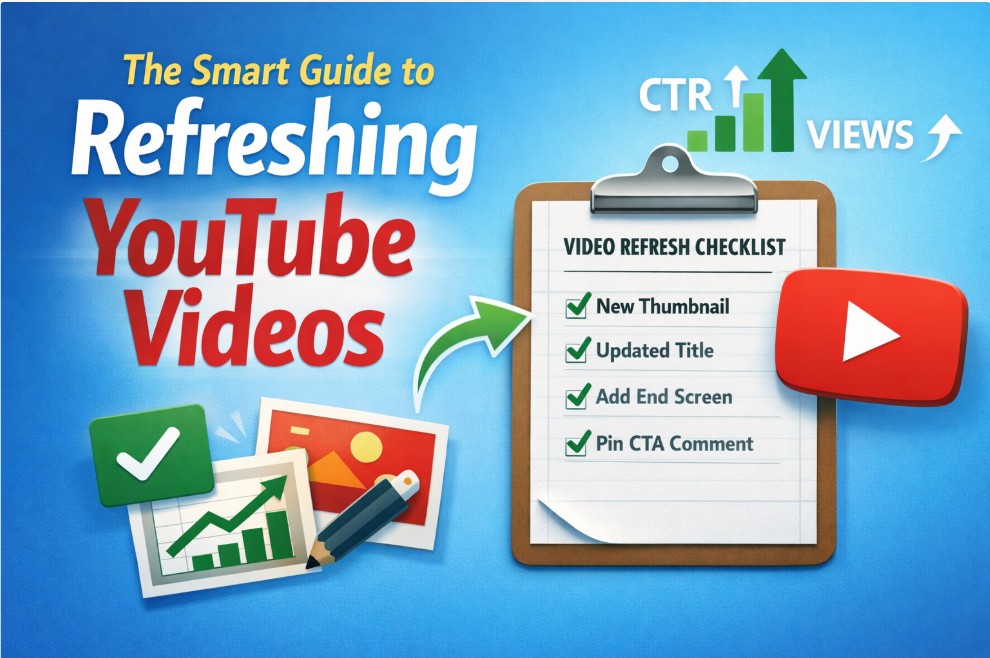
Simple Video Refresh Checklist
- Update thumbnail first
- Wait 24–72 hours
- Update title
- Improve description hook
- Add end screens and cards
- Pin a CTA comment
- Review CTR and impressions after 7 days
Final Takeaway
A YouTube video refresh is an update to an existing video — not a re-upload.
For evergreen content, refreshing old videos is one of the fastest and most efficient growth strategies available.
Before filming something new, always ask:
Can this video be refreshed instead?
Often, the answer is yes.
Here is a typical refresh workflow checklist.
| Step | Task | Before CTR % | After CTR % | Impressions (7d) | Status ✓ | Notes |
|---|---|---|---|---|---|---|
| 1 | Confirm video is evergreen | ⬜ | ||||
| 2 | Record current CTR | X.X | ⬜ | |||
| 3 | Record avg view duration | ⬜ | ||||
| 4 | Create new thumbnail | ⬜ | ||||
| 5 | Upload new thumbnail | ⬜ | ||||
| 6 | Rewrite title | ⬜ | ||||
| 7 | Update description hook | ⬜ | ||||
| 8 | Add end screen | ⬜ | ||||
| 9 | Add card at drop-off | ⬜ | ||||
| 10 | Write & pin CTA comment | ⬜ | ||||
| 11 | Review results after 7 days | X.X | #### | ⬜ | ||
| 12 | Decision: Keep / Tweak / Revert | ⬜ |
You can see our related videos and blogs by the following links.
Our related YouTube shorts,
Our related YouTube Videos
You can see all our wellness related blogs here.
To never miss our future postings sign up to receive our newsletter by the short form below.